EVOLV
-
Posts
68 -
Joined
-
Last visited
-
Days Won
9
Content Type
Profiles
Forums
Downloads
Everything posted by EVOLV
-
You can do that, as Kibbelz has said, in the Common Event Editor. Go into that, then: Down in the left hand side at the bottom, select "Level Up" as your trigger. In the Spawn/Execution conditions button, you can choose 'Level is'... Then 'Equal to'... and input '10'. Then you will write what you want to display on the player screen or chatbox in the commands field. You can also run a Conditional branch directly in the commands field. which checks if the player is 10, but those can get messy if you want multiple level up events. If this is specific to the player's class, which it seems to be, I would add another Spawn/Execution condition of 'Class is'... then select "Adenturer". If you want to get right to the point, you could even do 'Show options' to be prompted to change class, directly. However you do it, hope this helps.
-
Congratulations! Can't wait to dig in!
-
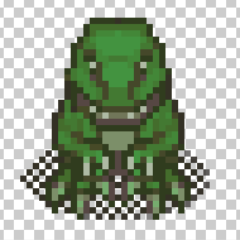
Hey guys -- I have occasionally been asked if I could share the dinosaur models I've created for A4C, and I'm only happy to. Thought I'd just post a thread. Here are some sprites for anyone looking to add some prehistoric NPCs: Enjoy!
-

[Tutorial] Step-by-Step Quest Creation Using Quest Editor
EVOLV replied to EVOLV's topic in Community Guides
Hope you have had success, Pink. Sorry I have been away from the forums as I had a totally impromptu "vacation" where I got called to do some contract work away from my usual homespace, here. As SCTrav says in the excellent explanation they gave, you can really make the Event Driven function anything you want. It's totally dependent on you telling your game, "Okay, quest is done!" at the appropriate time. In essence, remove the part about killing NPCs in my tutorial, and it'll work just as well. I should be around a bit more in the coming days if there is follow-up or you are still having trouble!- 15 replies
-
- 1
-

-
- quests
- quest editor
- (and 5 more)
-
Was thinking about doing a Linux hosting tutorial. Seems to still be a lot of questions about how to do it, step-by-step. I think most people will be pleasantly surprised with how easy it is, and how cheap.
-
- Skaveron and Agoraphobic
-
2
-
I'm ancient, so I was coding back when JavaScript was a thing geniuses knew how to do. So you learned it to become a genius! Seriously, tho - I think there's a lot to be said for how programming is now advertised as 'learn it in 6 weeks' or some other thing, and you can go six months and feel like you know nothing. It is not a 6 month process. It is not a 6 year process, even. It's constantly learning and uncovering and breaking stuff. It's putting stuff into an IDE and failing to compile it and wondering why it isn't working for days and days until you follow a different tutorial or guide or book and it works, but you still don't know why the first one didn't work and the second did. And you stare that this code and it means nothing. Sure, you know a few words and have a hunch about what one or two lines is doing, but you don't know why it appears that there are three other lines that also seem to be doing the same thing. So you read another tutorial, and another, and maybe buy a reference book. Then one day, you look at an old program you couldn't compile before, and you see it. Sticking out, clear as day to your older, wiser self, is the problem. You fix it. It runs. And all the other stuff around it? You can suddenly read it and understand what most of it means. Anyone 'learning to code' is in the same boat as any of us who've done it for a few years. There's always something else to learn, there's always a neater, faster way to write a program. You'll have a bazillion compiler errors and a bazillion more unstable builds along the way. tl;dr: The first 20 hours of learning are the hardest. Find a mentor -- find one here at this forum, even. Stack Overflow is your friend. Someone on Reddit is working on this thing, which is a pretty neat guide for what to expect along the way. You can do it!
-
I just thought this was too wacky not to share here, too... found old instances of the game on a flash drive. So, here's Age of the Four Clans ~2 years ago: And here it is, now: Stick with your projects. You never know where they're going to be in just a few months' time. This is actually the third instance of re-creating this game (fourth, if you count the 3D instance I never did get off the ground) so yeah, been a long ride, but a fun one.
-
It sounds like you are getting solid advice on here. From personal experience... I started in multimedia design and got a degree in that (Associates) in 2002. Quickly found the only companies hiring "multimedia artists" were paying $9/hr and wanted them to be able to program (at the time) "high-end" websites in Flash. Oh how far we've come. I moved around a lot in my 20's and learned what developers of any capacity outside of and within the realm of web design were worth. I made good money at jobs after combining my art skills with programming. I learned some Java at one company which led to learning a little C and so on. Eventually, I was making good money as a dev, but was getting burned out. So I started to do various side projects. Eventually, those became more profitable than my jobs and all I needed was health insurance to keep me happy. Anyway, older and wiser at 35, I now work a 9-to-5 at a hospital which offers me tons of downtime (to visit the Intersect forums!) and a light work-load week. It pays nearly twice what web devs in this area make because people in rural USA still have no idea what a programmer analyst does let alone how to pay them. Meanwhile, I have just made a little program in PHP that took me literally a week to throw together (the biggest part has been putting data in the database) and they're considering upping my salary considerably to keep the stupid thing up to date. So, there's that. Plus my side jobs are still my passion, and I'm able to make hobby games like A4C which, who knows, could turn something of a profit one day, too. It's all in what's "enough" for you. Knowledge is power. Don't feel obligated to go to school for programming (I didn't) but if you can afford to, do it. Enjoy your work. Learn new languages. Don't worry if hiring managers don't seem to know what they're doing because as famously chronicled on the internet, the guy who invented NodeJS wouldn't have been able to get a job in NodeJS with the way some recruiters seek candidates. Good luck out there!
-
Really nice. Maybe, at most, adjust kerning by moving the 'd' in Legend a little closer. Awesome work!
-
[Tutorial] Creating Event-Driven Effects (Birds and Critters)
EVOLV replied to EVOLV's topic in Event Systems
Well, you are very kind and I blush from the praise - I am just happy to share. -
I think this is a solid tutorial, Gib. It is a complex matter to handle housing in Intersect, but it can be done. I have in development right now an "inn" system that will let you hold a room for a few hours before it kicks you out and is publicly available for rent and it was similar to yours. A real head scratcher I've not fully figured out, too. Basically, it goes something like this: Create an 'Inn' map where rooms can be rented. Within the map are 'room' events which show open/closed doors depending on global variables (Room1IsRented, etc). Default is to just display a door which you cannot enter. Second tab states that it displays a lit-up entryway which, on touch, warps player to room if it is rented. Within the Inn map there is also an event-NPC who 'sells' the rooms. He sets the global variables as well as a player variable (IsRentingRoom1, etc). Create the 'rented' room which kicks the player out and sets the global (Room1IsRented) to false after an hour. I also set the 'rented' room to have a locked door system. This is a global variable triggered by an event within the rented room to show locked/unlocked status on the room event within the 'Inn' map. In other words, a curtain shows up on that room within the inn map, when the door is locked, telling players they cannot enter. Warp is also removed. I don't mind telling you folks that bit about kicking the player and resetting switches after an hour is the most difficult task, presently. I have it set to wait in intervals of 30000ms to trigger kicking anyone out... for an hour I'm probably missing an easier way.
-
[Tutorial] Creating Event-Driven Effects (Birds and Critters)
EVOLV replied to EVOLV's topic in Event Systems
Thanks much, guys. Glad especially that everyone thinks it's easy to follow. Chasing those birds around in-game has traditionally been bizarrely popular. If anyone's interested, I am chronicling our Intersect development adventures over here: http://evolvdesign.blogspot.com/ That site has links to the tut's I've done, here. It's sort of a WIP catalogue.- 10 replies
-
- 1
-
-
- map building
- animals
- (and 7 more)
-
Simple Event-Driven Effects in Intersect Date Modified: 7/7/2017 Engine Used: Intersect 3.1 The following guide will show steps to create a simple map accent in the Intersect Engine. For this tutorial, we'll make some birds that bounce around on your map and fly away when the player gets close to them. After completing this tutorial, the developer should have a basic understanding of events and self-switches. This is a simple tutorial that's probably not out of reach even for beginners and I made it with relative newbies in mind. An example of what we'll be creating is here: Pre-req: You should have some basic familiarity with the Intersect Engine and how to access the Event Editor. Requirements: You should download Intersect 3.1. You will be using sprites which, as of this writing, still come with Intersect (in the entities folder, sprites 129 and 130). If you are viewing this tutorial after these sprites are no longer included and/or otherwise don't have them, you may download them, here: http://gloryhound.info/wp-content/uploads/2017/07/129.png http://gloryhound.info/wp-content/uploads/2017/07/130.png SPECIAL NOTE: The bird sprites are for learning/testing purposes only. I do believe they are RPGMaker sprites and I am not familiar with how the sprites are licensed. Therefore, I do not recommend using them in your final game. SPECIAL-SPECIAL NOTE: I hope to replace these with my own sprites, soon and will be happy to share with the community when I do. Setup If You Downloaded the PNG Bird Files: Download the bird files above, if you do not have them. Place them in the Entities folder as if they were going to be characters (which, they kind of are!) By default, the entities folder is located in: Intersect/resources/entities Part 1: Using the Event Editor and Self Switches -- Bird on the Ground Part 2: Using the Event Editor and Self Switches -- Bird in the Air You can have a lot of fun with Intersect and little details if you know how switches and variables work so I hope I did a pretty decent job of explaining this simple task and what it's telling your game to do. When you master the basic stuff, it becomes easier to write more complex story-building moments, and I think the self-switches give a lot of opportunity to do that. More to come. Happy building!
- 10 replies
-
- 5
-
-
- map building
- animals
- (and 7 more)
-
I think you guys picked some good ones, and sorry I didn't get back in time. Best luck to our new mods!
-
[Tutorial - WIP] Using the Animation Editor in Intersect
EVOLV replied to EVOLV's topic in Community Guides
Placeholder for adding lighting portion of this tutorial. -
Animation in Intersect Date Modified: 7/4/2017 Engine Used: Intersect 3.1 The following guide will show steps to create an animation in the Intersect Engine. I made this guide as a follow-up for the Quest Guide, here, so I could go into more detail for people who need help using the animation effects. The guide uses Intersect 3.1. Pre-req: You should have some basic familiarity with the Intersect Engine and how to access the Animation Editor. Requirements: You should download Intersect 3.1. You should have some sort of graphics software which supports PNG files, such as Photoshop, if you are going to make your own animations. If you are not making your own animation and just want to use the editor, you should download our sample animation, here: http://gloryhound.info/wp-content/uploads/2017/06/questafter.png Step 1: Understanding the animation file (PNG) Step 2: Understanding the Animation Editor More to come on this one, folks. Consider it a WIP!
- 2 replies
-
- 3
-
-
- moving items
- design
- (and 5 more)
-
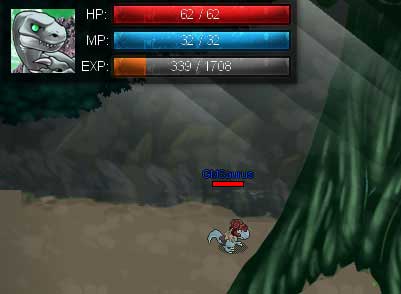
Pain in the rear lighting system is go. Free to use if you want to try it, yourself -- download the one I'm using on my local machine and make it into an animation (1x5), then set an event to play it:

-
[Tutorial] Step-by-Step Quest Creation Using Quest Editor
EVOLV replied to EVOLV's topic in Community Guides
I definitely want to continue to make tuts now that I got this one going on. My game is at the stage where I can literally screencap what I am doing as I go along and bang out a guide for people. Also, videos are a good idea. I have OBS for streaming, which I rarely get the opportunity to use. This would be a good excuse, eh?- 15 replies
-
- 2
-
-
- quests
- quest editor
- (and 5 more)
-
[Tutorial] Step-by-Step Quest Creation Using Quest Editor
EVOLV replied to EVOLV's topic in Community Guides
Thanks mates! As I said -- if I missed anything, be sure to tell me. I'll get it remedied. -
Step-by-Step Quest Creation in Intersect Date Modified: 6/27/2017 Engine Used: Intersect 3.1 The following guide will show steps to create a quest which will allow the game developer to take advantage of all the great features Intersect has built in. After reading this guide, the developer should have a good grasp of the ways by which the quest system is set up. The guide uses Intersect 3.1. Pre-req: You should have some basic familiarity with the Intersect Engine, how to access the Quest Editor and the Events system. You should know the basics of the Event editor commands hierarchy system. You should understand the basics of the Animation editor if you want to add the "!" and "?" symbols above the head of your quest-giver in the Optional Precursor. Requirements: You should download Intersect 3.1. You should have some sprites to use for your quest-giver event, as well as some monsters set up in the NPC editor. Basic stuff! Precursor (Optional): For this guide, we will be using quest animations specific to the point in the quest which the player has reached (The "!" and "?" symbols above the NPC's head). Step 1: Figure out what you want the quest to do. Step 2: Let's create the quest itself! Step 3: For this part, we'll need to create an event (an NPC) who will both give the quest and act as a return point for when it is completed. So I hope this winds up being a help to some folks who are trying to get to know the Quest Editor system a little better. Rest assured I'll try to keep tabs on this thread and improve/add to this as necessary. That in mind, I may have forgotten some things, so if you find an error, etc., let me know! Thanks and happy questing!

- 15 replies
-
- 12
-
-
- quests
- quest editor
- (and 5 more)
-
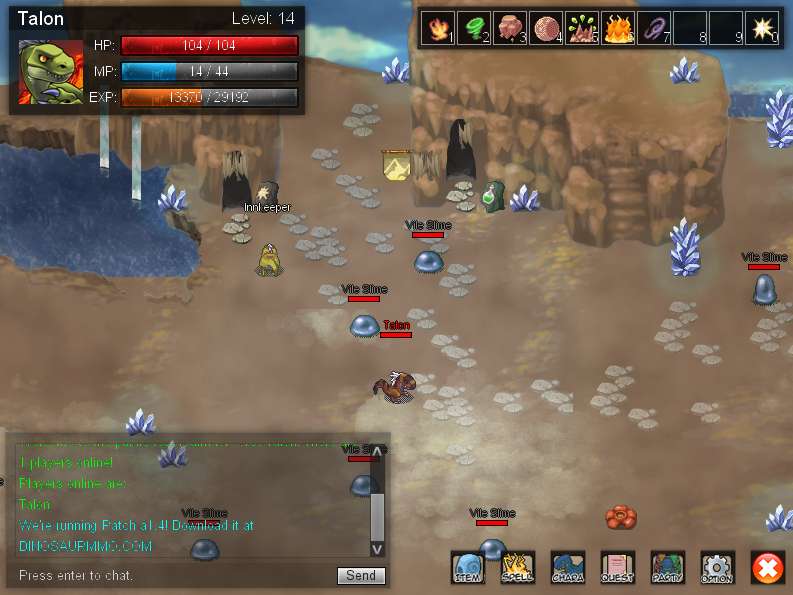
Beep bop boop. We just secured a new Linux server and should have an update this week about getting online for more testing at http://www.dinosaurmmo.com Working on more maps and slowly but surely annihilating the RPGMaker tiles 'til then.
-
More vid'yas. More stuff. More dina'saars. http://www.dinosaurmmo.com
- Show previous comments 1 more
-
-
So far we have 92(? maybe more?) maps ready for people to run around with. We have another 40 or so in development. 3 "cities" with class trainers, warpmasters, shops and inns (providing our current go-home spell) in each. I just put in these long-necked brachiosaurs, giving us six unique dinosaur types to fight with lots of variations on each (visually they are mainly recolors for now, but we're working on that). From our three starting classes, we have sprites for three branch-off classes each, 9 spells/skills complete which players can learn at the trainers' quarters, and a bunch of clothes/weapons/paperdoll stuff to wear.
We had a great time opening it up for our early Alpha through this year until our host put up a firewall which blocked maybe 50% of people trying to login. We couldn't reconcile with them so we just took our business elsewhere and will be finding further hosting, soon. Definitely getting us back online before end of summer. Probably before July if we just wanted a quick'n'dirty Windows VPS setup.