

wishy
-
Posts
204 -
Joined
-
Last visited
-
Days Won
26
Content Type
Profiles
Forums
Downloads
Everything posted by wishy
-
try "Port": 587, "UseSsl": true, if that doesn't work "Port": 587, "UseSsl": false, in gmail settings allow "less secure" apps ( https://myaccount.google.com/lesssecureapps )
-
@AisenArvalisHere's an extended example of the above tutorial, hope it's a bit clearer now: I should probably add that it's better practice to have condition contain a special character (adding a - at the end when you add strings and a - in front of the condition for example), like this: this way, the condition does not trigger if a player should happen to have the same name as your event, because data in the string is stored like this for the above example: "eventname1:playername-eventname2:playername2-eventname3:playername" Why? because playernames can't have special characters
-
Pretty self explaining, either use a secure server or set "UseSsl" to false if your pass and login are correct
-
There's many possibilities for this, it's just an example that indead replicates switches, but without the need of having to make and edit a bunch of variables/switches and events each time. (says so literally in the first line of the tutorial) You can only do a limited amount with self switches, this is more extendable, you can add character names, map names, positions etc... I use this logic for all my housing, interior options, farms, doors, etc...
-
Gonna do an attempt at showing you how to use string variables for a basic eventsystem which can easily be copy/pasted instead of having to make and edit a bunch of variables and events each time. Here's a video of the result: 1. Create a global variable, make sure it's a string and empty 2. Create a map event, rename it (name must be unique per event) 3. Assign an animation or sprite to it 4. Add an event that sets the global variable (set in step 1) to \gv{nameofglobalvariable}\evtparam{evtName}- (This will change the global variable to the current content of the variable + "1-", basically adding the name of the event to the current string) 5. Click Spawn/Execution Conditions 6. Click Add List > Add Condition 7. Check the global variable set in step 1, check if it doesn't contain (Negated) \evtparam{evtName}- So anytime the global variable doesn't contain the name of the event, this page will trigger. 8. Copy/paste this page, change the sprite or animation and uncheck the negated condition 9. Change the event to set the global variable (set in step 1) to Find \evtparam{evtName}- and Replace it with an empty string. (this will remove the event name from the global variable) 10. Now you can copy/paste this event anywhere in your game, the only thing you need to do is change the event name to a unique name full video of this tutorial:
-
Added the way I fixed that in my game, every game is different though, so people should fix it on their own way
-
Need to unequip an item in one of your events? Even though we don't have an option to unequip items, there is an easy way around this. Start by making empty items for every slot you need to unequip. Whenever you need to unequip an item, you can: 1. Give invisible Item 2. Equip invisible Item 3. Take invisible Item This way you can unequip any slot you want at any moment, without having to check what items are equipped, how many are in inventory etc... (aditional steps might be required when the player has a full inventory) In my case, when the player has a full inventory, I swap out the 'Player Journal' temporarely, because the journal is an item the player always has in his/her inventory. extra steps when the player has a full inventory:
-
try https://www.ascensiongamedev.com/search/?q=formulas&quick=1 or look in server/resources/formulas.json
-
gonna try to explain it, correct me if I'm wrong lets say u had an event with these conditions: The event should trigger when, in this example, 'justtaunted' is true The actual event: Before, this event would set the variable to false and still start the event 'restorewarriormana', even though you just set the condition to false now you have to start the event before changing the variable, else it won't trigger anymore:
-

Graphics Custom graphics inspire on zelda link awakening
wishy replied to lobo's topic in Design & Creativity
I love it! If I really have to be constructive, there is something off with the tree's, especially this part: -
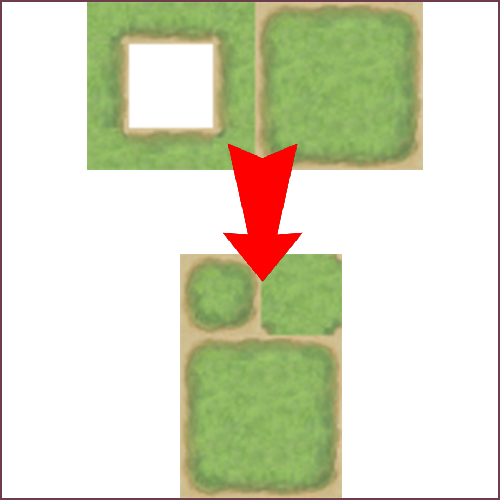
Version 0.0.1
594 downloads
1. Put a 128x64 png in the same folder as Tiled to VX convertor.exe 2. Open Tiled to VX convertor.exe and let the magic happen Embedded Video Link video: -
Can't wait to see more!
-
Story Today I did this on my project...
wishy replied to SkywardRiver's topic in Design & Creativity
finished the basics of my 1vs1 arena Detects when a player logs out or when both players log out. Arena starts when 2 people signed up within a certain timeframe (10 sec, for the video). Arena winner is the last one online or alive in the arena. Draw when timer runs out (60 sec, for the video). Now I need to figure out some sort of matchmaking... -
@GabThiaislmftfy
-
Not sure if it matters, but Bearer has a capital letter, rest looks fine, have not tested your code though
-
What's the maximum string size?
-
Story Today I did this on my project...
wishy replied to SkywardRiver's topic in Design & Creativity
Basic cash shop is working, decided to work with serial numbers/keys for a few reasons. Embedded Video Link- 1318 replies
-
- 11
-

-
Story Today I did this on my project...
wishy replied to SkywardRiver's topic in Design & Creativity
Made user login + code redemptions, first steps towards a cash shop Embedded Video Link -
Story Today I did this on my project...
wishy replied to SkywardRiver's topic in Design & Creativity
little tool available at -
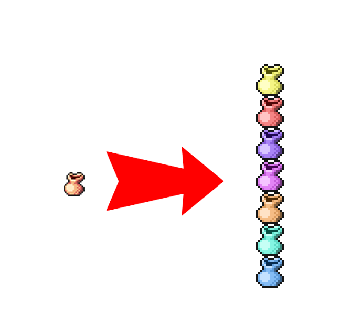
Version 0.0.2
1395 downloads
This tool will generate a green, red, cyan, orange, yellow, blue, purple and pink version of any .jpg,.gif,.png or .tga and output them in the 'result' folder Just place main.exe in the same folder as your images, and the tool will create a 'result' folder., see video for an example Embedded Video Link- 1 review
-
- 3
-
-

-
Story Today I did this on my project...
wishy replied to SkywardRiver's topic in Design & Creativity
Embedded Video Link here you go -
Story Today I did this on my project...
wishy replied to SkywardRiver's topic in Design & Creativity
Main and secondary professions implemented and big parts of the farming done -
Story Today I did this on my project...
wishy replied to SkywardRiver's topic in Design & Creativity
Ingame ranking with 'banners' that change based on your rank and gender Embedded Video Link -
Story Today I did this on my project...
wishy replied to SkywardRiver's topic in Design & Creativity
There will be If by editing you mean adding/deleting items.