

Chronos
-
Posts
164 -
Joined
-
Last visited
-
Days Won
7
Content Type
Profiles
Forums
Downloads
Everything posted by Chronos
-
It seems one of my links I copied messed up, should work now. There were some odd characters behind it.
-
Mostly convenience, really. Not to mention it's free at the moment. (And honestly I doubt I'll ever charge for anything below a certain threshold). I imagine most advanced users are more than capable of hosting their own updates and whatnot. But if they want something quick, simple and without any hassle on their own end this'll do the trick; No pesky patch makers to run, no configuring webhosts and no remembering what files you've changed.
-
Note: The service, website and certain areas are very much a work in progress. Any feedback you can give me on the workings of this website is more than welcome. https://my.gopatch.it/ (The main website is still a work in progress on my end, so no fancy stuff just yet!) A service designed to get your games updated with as little effort on your side as possible! Upon logging in you will find yourself in a management interface much like this one: Here you can add new games to your account, upload a new version to your game and download a key file to use with a basic updater I have written so you can get your users the latest version of your game without the hassle of setting up a webserver or anything of the sorts yourself! Of course, now you ask me? How do I get started with this? Well! It's simple! Just follow these steps: 1. Register an account and log in (https://my.gopatch.it/ ) 2. Click the blue + icon on the bottom right of the page. 3. Enter your game's name and click Add Repository* 4. Click the Upload symbol () and upload a *.zip file containing your entire game. 5. Wait for the system to e-mail you about the progress of your update. This generally takes a minute or two. 6. Download the patcher. (http://www.ascensiongamedev.com/resources/filehost/4bb64656d9e2c4e5efcf8c6567f50795.zip)** 7. Edit the LauncherTitle and ClientFile parameters in Options.Json to your game name and executable name. 8. On the website, click the Download symbol () and place the file downloaded next to the updater.*** 9. Launch the updater and watch it go! *= While there is currently only a free option, I am debating on whether or not to add paid options for more space or rely on Donations. **= Still working on proper API documentation so you can write your own, sorry! ***= This file contains all the necessary information to run the updater application for that specific game. For any future updates, just make a zip file of ALL your game files (not including the updater) and upload it much like you did the first time, the system will determine what has and has not changed and your clients will automatically be updated the next time the updater application is ran! There are currently a few pages that are not accessible, and some things may seem unfinished. Please do not hesitate to ask me any questions about the service or provide feedback on what you would like to see made or changed about this.
- 25 replies
-
- 11
-

-

-
Be aware that if you're willing to invest some knowledge into how Linux works, there are far cheaper options available for doing this. Windows servers are significantly more expensive in general.
-
A blob is basically anything, and it'll be stored "as-is" in SQLite. Could be a bunch of bytes, could be text or even a full blown file. The database won't know or care what it is, your program will have to deal with that.
-
@Gallus @Miharukun That should be removed in Beta 3 if they remember to do so. It's a remnant of an old version that have never been removed.
-
Not on its own, nor will it likely be officially supported. Doesn't mean you can't do it if you know how. But honestly I'd stick to whatever language the engine you pick is written in if you want any sort of help at any point. (Technically you could use most .Net languages interchangeably to an extent, after all.)
-
It's a decent resource, but it sucks for anyone not in the US as it only seems to track US pricing. Shame really.
-
Because switching maps does not reset your Z-Layer. You need to walk over a tile that changes it back to normal.
-
You've likely been playing with Z-Layers, make sure you're not on Z-Layer 2 when your NPCs are on Z-Layer 1.
-
Do note that you need to put some effort into making them work with Intersect, as some purchases come as 16x16, some as 48x48 and some as 32x32. So you'll likely have to resize a thing or two to the actual size you'll be using. (I stuck to 48x48 myself). There's tools available to do mostly everything for you, some that I've written as I've had to do it before and I didn't feel like doing it by hand. But it will take you some time and effort as not every sprite sheet uses the same settings.
-
I imagine the shield has to be rendered last if you want it to overlap everything else. Items that are rendered first will be below everything rendered after.
-
Okay, you're going to have to be very clear as to what exactly you want now then. I thought we had already sorted out the fact you needed to change your configuration, then you asked for encryption of your game files. We've provided answers to these problems, but what are you trying to achieve exactly?
-
Nothing happens how? What have you tried and what did you get?
-
So basically, a modern RealmCrafter interpretation? I'd say take a good look at where they failed and try to learn from it. Mind you, I'm not saying you're destined to fail. I'm just highly skeptical because over the past decade or so you're not the first person to promise an easy to use 3D MMORPG engine, and honestly I've seen most of them fail miserably.
-
Honestly, with nothing to show, no track record and no demos.. Not a whole not. Not to mention a 3D game is a lot more demanding in terms of resources and animations. There's not much going on in terms of easily accessible resources for people that'll work mostly plug and play, unlike say these smaller 2D engines. You'll likely have a fairly hard time getting anyone to really go for this, because why would the people that actually have the time and skill to make a 3D MMO not just use Unity and get a few cheap-o networking plugins or write them themselves? What makes your solution easier for those people in the long run? Can they customize everything extensibly enough to make it worth their while? You'll really want to put yourself out there and make a solid case as to why people need your solution to their problems. Right now all I see is empty promises with nothing to offer over any other solution.
-
@marikito @PhenomenalDev, At the moment there's no way to do this with Intersect itself but there is software available that can pack all your assets together into one executable. One that I -know- works (NOTE: I did not write this, but a guy called S4Real that used to be very active on various other forums did!) is called Vishnu Packer 1.9. There's a download for it on this page: http://www.gamegurufiles.co.uk/applications.html The UI looks a bit shoddy, but it's fairly simple to use. Just make sure to tick this box when on the build menu: It'll detect your game's executable on its own, and pack up all your assets and libraries into a single file. (I think it uses a virtual drive somewhere to store everything in on run-time, but I can't recall the specifics) There's also a paid piece of software that does a lot more made by someone else: http://www.smartpacker.nl/smartpackerpro.html (though I can't say I've ever used this.)
-
It's possible, but it's a 2D game. If people want to steal your stuff there's going to be nothing stopping them from taking a screenshot and just using the graphics anyway. Or recording your music. Ultimately, it'll just be a lot of effort to stop 1-2 people while everyone that really wants it rips it in other manners.
-
This is incomplete, as there's also the bans, characters, char_bank, char_hotbar, char_inventory, char_quests, char_spells, char_switches, char_variables and mutes tables. This query should wipe any and all user data from the database, however: CREATE TEMP TABLE _Users(id INTEGER); CREATE TEMP TABLE _Characters(id INTEGER); INSERT INTO _Users (id) VALUES ((SELECT id FROM users)); INSERT INTO _Characters (id) VALUES ((SELECT id FROM characters)); DELETE FROM users WHERE id IN (SELECT * FROM _Users); DELETE FROM bans WHERE user IN (SELECT * FROM _Users); DELETE FROM mutes WHERE user IN (SELECT * FROM _Users); DELETE FROM characters WHERE id IN (SELECT * FROM _Characters); DELETE FROM char_bank WHERE char_id IN (SELECT * FROM _Characters); DELETE FROM char_hotbar WHERE char_id IN (SELECT * FROM _Characters); DELETE FROM char_inventory WHERE char_id IN (SELECT * FROM _Characters); DELETE FROM char_quests WHERE char_id IN (SELECT * FROM _Characters); DELETE FROM char_spells WHERE char_id IN (SELECT * FROM _Characters); DELETE FROM char_switches WHERE char_id IN (SELECT * FROM _Characters); DELETE FROM char_variables WHERE char_id IN (SELECT * FROM _Characters); DROP TABLE _Users; DROP TABLE _Characters;
-
If that IP address is your hamachi IP, then it's correct.
-
Uhm, client. Not server.
-
I believe so, as long as you edit your client's configuration appropriately.
-
Version 1.0.0
1904 downloads
Ever had 200 sprites to resize in one go? I know I had when I made this little tool. Once the program starts it'll prompt you to put your sprites in the generated input folder, and to enter by how much you want to scale your sprites. (in mathematical values, so to resize it 200% enter 2 as it will take the sprite size times 2 to resize it). And that's all there is to it. If you need the source for whatever reason, see Github. -
Version 1.0.0
964 downloads
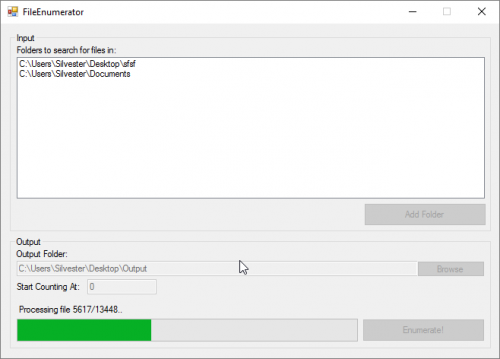
Ever had to deal with several sprite packs that each have a couple hundred items in them, but have the same names? Bah! Dealing with that is such a hassle. Well, that is unless you use this tool. This tool will allow you to select a list of folders to look for files in (Warning: it will take -ANY- file from -ANY- subfolder) and enumerates them in a neat and orderly list starting to count from a number of your choosing. The result will then be copied to a new folder for you to use in your project. If for whatever reason you want the source, it's on GitHub -
Ah! that's fairly simple, and we can do this two ways.. The query based method, or the manual way. The Query based method assumes you know what your databse columns are named, and are easier for things like bulk actions. The manual way works for novice and expert alike, though might be slower for large edits. Before you do anything though, open your database with the Open Database button up top. You'll see a few tabs to choose from, we'll start with the Execute SQL tab. This is where you can enter queries to edit or check certain things. I won't bore you with a full laydown on how to use Sql (there's plenty of better resources for that on Google! Though be aware that SQLite only has basic functionality) but a basic query to edit a character's level is as follows: UPDATE characters SET level=2 WHERE name='Chronos' That's it, simple enough right? We're updating the Characters table, and setting the Level column for the character Chronos. To execute this just hit the Run button above the query input. The second way you could do this is in the Browse Data tab, which looks a bit like this: As you can see, I've already selected the Characters table, but there's alot more to explore. To change the level however, all you need to do is find the character who's level you want to edit, click the field and edit it on the panel to the right. Hit Apply and you're good to go! (Because SQLite is a file based Database you need to hit the Write Changes button up top to commit them to the disk, do be aware that doing this while the server is running might corrupt things as the server might be saving data to the database after you've loaded it which are lost when you save your older version of the loaded database on top of it!) And that's basically how you can start editing values in your database!