

Chronos
-
Posts
164 -
Joined
-
Last visited
-
Days Won
7
Content Type
Profiles
Forums
Downloads
Everything posted by Chronos
-
Well, I made this to make it a bit easier to deal with such tasks: Alternatively, you could find an SQLite browser and do it manually.
-
Just added a color picker, though it refuses to work in Edge for some reason.
-
First big update in a while, you can now add a customized version number (e.g. 2.0.5b) and patch notes to your updates! These changes will -not- break your old updates, and you can keep using the old updater if you want to. Download the new patcher here: http://www.ascensiongamedev.com/resources/filehost/ef72f949df90cba32eba0a3187811057.zip I still need to sit down and document the API some time, unfortunately it's really really boring to do so. I'll get to it at some point. It's all fairly simple, just need to know how to use it! Currently still moving stuff into my new house, and I'm getting married soon. So I'm not sure when I'll get to it.. but I will! (Also a big thank you to @DudeItsCorey for reminding me to add this!)
-
I've seen a few repositories pop up, but no error logs (in the places I keep track anyway).. So I'm guessing all is well! Still need to get up and finish some of the pages. But I just haven't found the time as I'm moving and sorting out the new place. If you find anything or need something, shoot me an e-mail though. I'll take a look at it!
-
I've been playing it for a little while now, and while it flows (fairly?) well, I don't think this was ever designed with more than 2-3 people trying to level in mind. The maps are small, linear, the mob spawns limited and there's one quest per map for the mobs on said map (generally). If there's more than 10 players starting at the same time (as might happen with a Steam launch!) what are they supposed to do? there's not enough monsters or space to go around for them to play on. Aside from that concern, I've noticed a few other minor points: If I am underlevelled for a quest, it doesn't tell me what level I -do- need to be to pick it up. Making me backtrack to every quest giver I know of every level. Talents do not show you what level they require, making me try if I can go to a higher tier every level so I don't miss out on the higher stat gains. Some of the menu buttons don't really tell me what they do. For example: The big gold G for talents looks like a cash shop icon. The book for settings looks like a questlog, the trading icon looks like a mailbox, the party icon looks like a friendlist, the guild menu.. I don't know what that's supposed to be and the Title menu looks more like a world map. A lot of the menus don't have a clear button to close them. Especially on the fullscreen ones I feel like a big ol' X to close it somewhere would really help. Hitting escape closes the game rather then closing all UI items, and when there's none open it could open up a menu with settings and the exit game button. Keybinds? Not sure how well hitting WSAD will go over on an AZERTY keyboard. Only being able to switch maps on a road through Warp tiles looks incredibly cheap and makes it even more linear. Why aren't the maps connected properly? Why can't I go to somewhere that is clearly there and not blocked off just because there's no road there? Or why are entire sections just straight up fenced off except for the road? All the quests I've done so far are completely uninspired, gather X of Y or kill X of Y. No threaded storylines that take me on a journey, no characters you get to know over time. I get it, you want a more open feel to the world and making linear story quests would probably limit you doing this. But in only making these basic quests where you gather or kill 12-20 things you're not making a very interesting experience for players either. It's a fairly solid base, but there's some (QoL) things holding it back a bit, and I know some of them are part of the Eclipse Legacy, but that doesn't mean we can't move past them and do it right.
-
No problem man.
-
There should be a button to the right side of the linked page that links to the Download.
-
Version 1.0.0
803 downloads
This tool does one simple thing; it converts sprites from the RPG Maker 2000 format to the RPG maker VX format. To get these sprites usable in Intersect please see the VX to XP tool. It's simple to use; Upon starting the application it will prompt you to place your files in the input folder. Hit a key and the application will do all the work for you. In case you want to see or change the source code for this application, see GitHub. -
Just got reminded about this by your post. Finished it. All this tool does is change into the following: Any other steps can be taken with tools that already exist on these forums.

-
Using Intersect? it'll likely work in MonoDevelop. (Currently you can already run the server on a Linux box!) Orion+ however isn't made to be cross-platform.
-
I could probably whip something up in the weekend, it's not the hardest thing to swap a few rows around. If I remember to I might take a peek tonight as well.
-
You can change it, but this is not recommended as you'll cause all sorts of problems if you don't know what you're doing. Since maps are rendered seamlessly as it is I would highly recommend connecting maps over making big ones. To connect maps just double click on the blank space next to a map in the editor, they'll appear to be ''one'' map in the game client. (For a short explanation: Maps are cached in GPU memory once rendered, they are currently stored in a texture at a size that the majority of GPUs will accept. If you change this drastically, however the textures would become much larger and many GPU's, especially older ones will start showing issues.)
-
Well, you certainly didn't lie about it being a Sprite sheet.
-
That would have been @Damian666.
-
Call me skeptical, but this seems to just be a flat green map with a character creation screen (that is already IN the engine!) and something basic to tell us what it'll be about. Not really screaming "Work in progress" to me, more "I threw this together in 10 minutes!" I think you might have been better off waiting until you had something more to show to get people interested in your game. Right now it's just.. an empty Intersect project with a vague promise of being like a story that someone else wrote. Harsh, perhaps. But I feel other projects were held to a higher standard to be approved.
-
I'd say no. Though not fully impossible, it's certainly not an easy task and likely not worth the effort as you'd be losing data all over since the two engines just aren't the same or compatible. I'm sure someone will eventually try, but right now I don't think we'll see that happening. While the bits required -are- usable without the full source code (which isn't out yet!) I don't think many people have figured out how it works. Not to mention that the two formats are completely different from one another and this likely will not make it easy.
-
Uploaded a new version. Bugfixes: Fixed some crashes that could occur on switching between databases. Fixed a crash that could occur when switching between characters. Fixed an issue where closing the application would sometimes not save the database properly. Added the ability to change the following character data: Spellbook Added the following general features: Deleting an account*. Deleting a character*. *= These actions can not be reverted once taken, use with care!
-
Ever had that one player you just couldn't stand? Well I have the perfect solution for you! I'll probably get this version out soon. Still have to work on getting the spell editor in. Not a huge amount of work but I do need to find the time! (Note that this action can -not- be reversed once taken!)
-
I've been working on making this work: The Delete Account and Delete Character buttons. They might come in handy for you! I just have to make sure Intersect doesn't go kaboom when I load an account without a character.
-
Just uploaded a new version that has stats, vitals, inventory and equipment editing in it. Spells and hotbar are next on the list. Make sure to keep an updated copy of your config file next to the toolkit, as it pulls several bits of relevant data from it!
-
That actually reminds me, I should really add an export/import feature for all users. Anyway, I'm slowly reworking the UI a bit for character data as I've been adding more to it.. It was getting messy.
-
I've just finished adding vitals and stats to the program. I'll be taking a look at inventory, spells and hotbars next. (Note; There is no download for this version, but the source is available on GitHub!)
-
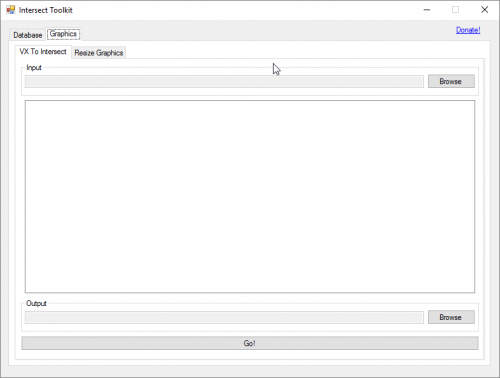
Intersect Toolkit The Intersect Toolkit is a small program that lets you handle various tasks you might want to perform while working on your game. These tasks can range from changing a player's data to making sure your graphics work in the engine. The toolkit can currently perform the following tasks: Change Player Data.* Delete tilesets from the database. Resize Graphics Convert RPG Maker VX Sprites to Intersect Formats (3 Frames to 4 Frames) *= Certain aspects of player data are not currently implemented due to either a lack of information from the Intersect source or being a work in progress. Please make sure to copy your server's config.xml to the same folder as you run this application from, it needs to read a few parts of it to function.
-
Version 0.3
4648 downloads
Intersect Toolkit The Intersect Toolkit is a small program that lets you handle various tasks you might want to perform while working on your game. These tasks can range from changing a player's data to making sure your graphics work in the engine. The toolkit can currently perform the following tasks: Change Player Data.* Delete tilesets from the database. Resize Graphics Convert RPG Maker VX Sprites to Intersect Formats (3 Frames to 4 Frames) *= Certain aspects of player data are not currently implemented due to either a lack of information from the Intersect source or being a work in progress. The source code is available for free over on GitHub. Please make sure to copy your server's config.xml to the same folder as you run this application from, it needs to read a few parts of it to function. -
It should work with anything .Net accepts. So anything Windows sees as a valid filename. Confirm that the file is actually in the Entities folder. If it is, remove any symbols from its name.