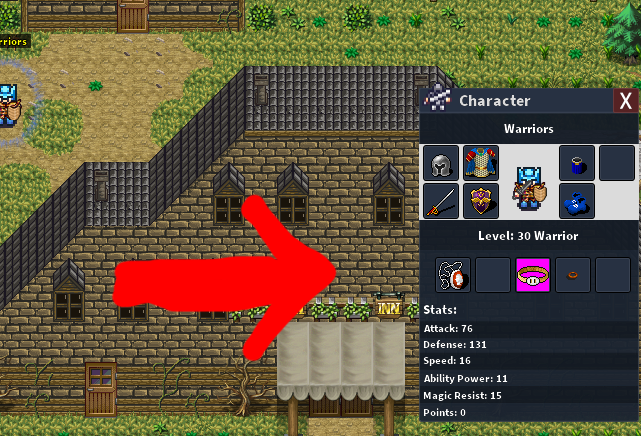
Push Posted May 19, 2020 Posted May 19, 2020 I was wondering if this was possible without changing source? Example: Id like the character info window to be larger in order to place the Equipment Slots around the character like most MMOs/RPGs have.
0 Push Posted May 20, 2020 Author Posted May 20, 2020 Answer: 1. Edit the window itself by changing the "character.png" file under Client and Editor/resources/gui 2. Change the window's position after that by editing the "CharacterWindow.json" file under Client and Editor/resources/gui/layouts 3. Edit the very first line called "Bounds". 5 hours ago, Blestro said: "Bounds": "1102,372,258,336", Height,width. 4. Make sure server and client are closed. Thread Closed. The Question has been answered. Thanks to @bonusminutes @Blestro & @Vhaeriel
1 Blestro Posted May 20, 2020 Posted May 20, 2020 nope 43 minutes ago, CosakiGames said: Thanks for the reply. I tried that previously and tried the "AlignmentEdgeDistances" with no success. Seems Bounds are hard coded because they always revert back. try this, first line of the layout Quote "Bounds": "1102,372,258,336", Height,width. Push 1
0 bonusminutes Posted May 20, 2020 Posted May 20, 2020 Im no expert, but you should be able to edit the window itself by changing the "character.png" file under Client and Editor/resources/gui You might have to mess with the window's position after that by editing the "CharacterWindow.json" file under Client and Editor/resources/gui/layouts Im assuming that if you have to edit something in the .json file it would be the very first line called "Bounds". Or maybe its "AlignmentEdgeDistances" a couple lines down. You can mess with them to try to figure out what each one does. If anyone knows any better, step in. The most Ive done so far in messing with .json files was to fix the health/mana/exp bars how I want them.Make a backup of both the .png and .json files before you edit them in case something goes wrong. Push 1
0 Push Posted May 20, 2020 Author Posted May 20, 2020 Thanks for the reply. I tried that previously and tried the "AlignmentEdgeDistances" with no success. Seems Bounds are hard coded because they always revert back.
0 Vhaeriel Posted May 20, 2020 Posted May 20, 2020 4 hours ago, Blestro said: nope try this, first line of the layout Don't forget to edit the file when your client is close, otherwise the values return as before Push 1
0 Push Posted May 20, 2020 Author Posted May 20, 2020 42 minutes ago, Vhaeriel said: Don't forget to edit the file when your client is close, otherwise the values return as before I have tried it a few times without the server/editor/client running and it always reverts back to the original bounds I was editing the first two sets of numbers...
0 Push Posted May 20, 2020 Author Posted May 20, 2020 5 hours ago, Blestro said: nope try this, first line of the layout Omg, im a dummy. I thought the first 2 numbers were height and width.... Thank you! that worked.


Question
Push
I was wondering if this was possible without changing source?
Example: Id like the character info window to be larger in order to place the Equipment Slots around the character like most MMOs/RPGs have.
7 answers to this question
Recommended Posts