


Kamus
-
Posts
172 -
Joined
-
Last visited
-
Days Won
28
Content Type
Profiles
Forums
Downloads
Everything posted by Kamus
-
Updated the app to the version 1.3 ¿What's a new? Thanks for the reported by @RoseEX we have small new features! Manual View Refresh: The automatic update while typing (which cause annoying jumps) has been removed. You now have the "🔄 Refresh View" button to preview changes only when u're ready~ Version Legends: i've added a visual indicator in the bottom-right corner of the main window showing the current version (1.3 on this patch) Direct Donation link: The "Donate" button now redirects u straight to the official website for donations of me Small Improvements and Fixes: Cursor and Scroll Persistence: When refreshing the view or using undo/redor, the code editor now keeps u exact cursor position and text scroll level was~ Code Optimization: Obsolete classes and timers (such as the old donation dialog) have been removed, making the editor lighter and faster
-
Thanks for that review!!! On the next update i'll put the "Update View" button for do it manually (the visual update) Also u'll stay at the same place on the JSON Code editor~
-
i Think the "defaultSkin" needs to be edited too but try to read the json files on the gui/layouts maybe there's the skin
-

Count as high as you can while staff are sleeping!!!
Kamus replied to Giligis's topic in Forum Games
5 -
Count as high as you can while staff are sleeping!!!
Kamus replied to Giligis's topic in Forum Games
3 -
Count as high as you can while staff are sleeping!!!
Kamus replied to Giligis's topic in Forum Games
1 -
Count as high as you can while staff are sleeping!!!
Kamus replied to Giligis's topic in Forum Games
3 -
RELEASED FOR FREE! (Despite not reaching the expected goal [i didn't even raise 1 U$D] i'm still going to release it to the public for the entire community) Any donation or reactions would be greatly appreciated~ ♥
-
Version 1.0.0
334 downloads
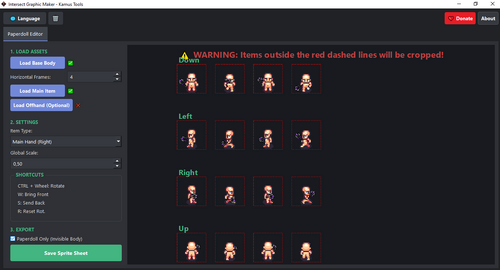
✨ Key Features Simple Layering: Easy load a Base body, Main Item, and an Offhand item (shield, secondary weapon). Intuitive Positioning: Drag and drop items into place in each frame Rotation via Mouse Wheel: Use Ctrl + Mouse Wheel to rotate any selected item with precision. Scale Control: Adjust the global scale of the items to match your base body size. Layer Ordering: use keyboard shortcuts to manage Z-ordering: W: Bring to front S: Send to back Clean Export: Choose between exporting the full sprite sheet (Body + items) or the Paperdolls Only (items pasted onto a transparent body silhouette for layering in-game) Multi-Frame Support: Supports sprite sheets with different horizontal frame counts (i.e: 4, 8, 12 frames) Multilanguage: Available in English and Spanish. 📸 Screenshot Troubleshooting & Feedback: If you find any bugs or have suggestions, please let me know in this thread! i'm happy to keep improving it. If this tool saves your time, feel free to SUPPORT my work: https://cafecito.app/kamuselreal <---- (Crypto enabled) https://www.paypal.com/paypalme/HelpForAll <---- Worldwide Thanks, and happy developing~ -
🌟 FREE TOOL RELEASE: Intersect Paperdoll Maker v1.0.0 🌟 (a tool of the Kamus Tools Suite) 🎨 Simplify Your Paperdoll Sprite Creation! Hello everyone! I'm happy to release a free and simplified tool to help you create your Paperdoll sprite sheets for Intersect (or any 4-direction, N-frame sprite system) quickly and accurately. This utility takes your body, your equipment sprites, and your desired rotations/positions, and exports the final, correctly combined sprite sheet for your game. 🚀 Key Features Simple Layering: Easily load a Base Body, Main Item, and an Offhand Item (Shield, secondary weapon). Intuitive Positioning: Drag and drop items into place in each frame. Rotation via Mouse Wheel: Use CTRL + Mouse Wheel to rotate any selected item with precision. Scale Control: Adjust the global scale of the items to match your base body size. Layer Ordering: Use keyboard shortcuts to manage Z-ordering: W: Bring to Front S: Send to Back Clean Export: Choose between exporting the full sprite sheet (Body + Items) or the Paperdolls Only (Items pasted onto a transparent body silhouette for layering in-game). Multi-Frame Support: Supports sprite sheets with different horizontal frame counts (i.e: 4, 8, 12 frames). Multi language support: English and Spanish available! ⚙️ How to Use Load: Load your Base Body sprite sheet first (i.e: Male Body.png). The tool will automatically detect the cell size. Load Items: Load your Main Hand and/or Offhand sprites. Select Type: Choose the item slot (Main Hand or Shield/Left Hand) to place the item correctly in relation to the body's Z-order. Edit: Use the mouse to drag the item into the center of each of the 4 direction cells. Rotate: Hold CTRL and use the Mouse Wheel over the item to adjust its rotation. Export: Click "Save Sprite Sheet"! 🖼️ Preview ⬇️ Download (Free!) 🐛 Troubleshooting & Feedback If you find any bugs or have suggestions, please let me know in this thread! I'm happy to keep improving it. If this tool saves your time, feel free to SUPPORT my work: (Inside the app on the Donate button) https://cafecito.app/kamuselreal<---- (Crypto enabled) https://www.paypal.com/paypalme/HelpForAll <---- Worldwide Thanks, and happy developing
-
NEW TOOL INCOMING!
- Graphic Maker -
Tired of wasting time aligning items frame by frame in Intersect?
This tool does the heavy lifting for you.

How it works?:1) Just upload your base sprite
2) load your item 32x32
3) Position it on each frame using the built-in editor
4) Export your full paperdoll sheet instantly
BONUS!: The app automatically removes the body behind the item. No more manual cleanup, no more headhaches
Results: (With body vs Without body)
PRICE: 5 U$DT - And then the project reaches 10 U$DT total, i'll release it free for the whole community.
If you're interested on buy, send me a DM on discord: KamusArg -
Updated the app to the version 1.2 ¿What's a new? - As was suggested by @Mcadams Now you can use the shortcut CTRL+F to navigate in the JSON files~ - Fixed a few visual bugs with "white" windows
-
:o Beautiful suggest~ i'll add it twomorrow!!!! if you have more suggest, i'll really apreciate them
-
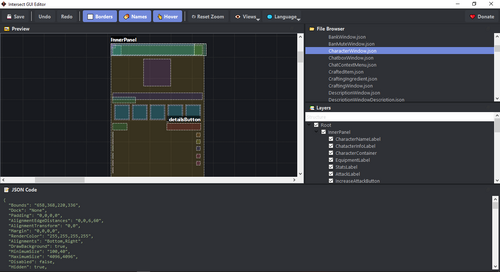
Hi everyone! Editing client GUIs by manually modifying JSON coordinates can be detious and prone to errors. I wanted dto streamline this workflow, so i developed a standalone tool to visually edit your Intersect Interface layouts Introducing Intersect GUI Editor by Kamus Tools. ✨ Key Features Visual Editing: Drag and drop elements directly on a canvas. No more guessing X/Y coordinates. Smart Layer System: View the hierarchy of your controls (parents/children) in a dedicated tree view. Real-time Zoom: Scroll to zoom in/out for pixel-perfect precision. Docking System: Customizable interface (VS Code style). Arrange the panels however you like. Safe Editing: Full Undo/Redo support (Ctrl+Z / Ctrl+Y). Multilanguage: Available in English and Spanish. 📸 Screenshot 🚀 Download 🚀 ❤️ Support the development: This tool is free to use for any project. If you find it useful and want to support my work (or speed up the development of future tools), you can find a donation button inside the app. Any support is greatly appreciated! Enjoy! Kamus
-
Version 1.3.0
520 downloads
✨ Key Features Visual Editing: Drag and drop elements directly on a canvas. No more guessing X/Y coordinates. Smart Layer System: View the hierarchy of your controls (parents/children) in a dedicated tree view. Real-time Zoom: Scroll to zoom in/out for pixel-perfect precision. Docking System: Customizable interface (VS Code style). Arrange the panels however you like. Safe Editing: Full Undo/Redo support (Ctrl+Z / Ctrl+Y). Multilanguage: Available in English and Spanish. 📸 Screenshot ❤️ Support the development: This tool is free to use for any project. If you find it useful and want to support my work (or speed up the development of future tools), you can find a donation button inside the app. Any support is greatly appreciated! PD: False positives due to PyInstaller packing Enjoy! Kamus -
"Como hacer un item que te cambie de nombre" ¿Qué vamos a necesitar? 1 Variable de jugador para almacenar el nombre 1 Evento Común (que se ejecutará cuando se use el item) 1 Item (podés ponerle el nombre que quieras) Paso 1: Iremos al editor de variables y vamos a crear una variable de jugador del tipo TEXTO (como se ve en la foto de acá abajo) Paso 2: Iremos al editor de eventos comunes y crearemos un evento vacío y lo llamaremos como querramos (este se ejecutará cada vez que se use el item) Trabajaremos en este evento después Paso 3: Vamos al editor de items y crearemos nuestro item con las siguientes especificaciones: Tipo: Evento Evento: El que creamos en el paso 2 (le añadimos que se destruya al usar) Paso 4: 1) Ingresamos una variable de entrada con los siguientes detalles Título: "Cambio de nombre" Texto: "Escribe el nombre que deseas" Variable de jugador: (y acá cargamos la que hicimos en el Paso 1) Longitud: acá los límites los ponen ustedes - Longitud mínima: Cantidad mínima de letras que podrá tener el nombre - Longitud máxima: Cantidad máxima de letras que podrá tener el nombre Le dan al OK y seguimos. 2) Damos doble clic y ponemos "Cambiar nombre Jugador" y desde la variable creada en el Paso 1 cargamos el valor 3) Acá metemos un mensaje de error en caso de que el nombre ya exista y devolvemos el item (porque si no pudiste crearte el nombre, lo lógico es que te devuelvan el item hasta que pueda ser correctamente usado) 4) Acá metemos un mensaje de error, longitud no aceptada, caracteres no válidos, etc y devolvemos el item (porque si no pudiste crearte el nombre, lo lógico como dijimos arriba, es que se te devuelva el item hasta que puedas cambiarte correctamente el nombre) Paso 5: Disfrutar el item Espero les sirva el tutorial~ (Tutorial a pedido de Faller)
-
POST ACTUALIZADO! Traducciones para la versión: B0.8.0.535! Ya disponible!
-
The new ones in B0.8.0.400 are: \c{color} text c{} example: \c{red} red \c{} text result: red text Colors by name: black, red, green, blue, yellow, orange, gray, cyan, pink, magenta, lightcoral, forestgreen, orangered Code for the HEX color: \c{#XXXXXX} text \c{} (replace the "X" with your code)
-
POST ACTUALIZADO! Traducciones para la versión: B0.8.0.345! Ya disponible!
-
POST ACTUALIZADO! Traducciones para la versión: B0.8.0.303! Ya disponible!!!
-
POST ACTUALIZADO! Traducciones para la versión: B0.8.0.274! Ya disponible!!!
-
POST ACTUALIZADO! Traducciones para la versión: B0.8.0.226! Ya disponible!!!
-
Here:
-
Very easy: [Spanish ver]
-
Paid - Export game to Android as .apk
Kamus replied to luciferofhell's question in Resource Requests
120k (?




